[memol txtt=”Let Us Help You” txtc=”If you’re wondering what the commission % for affiliates will be, here’s the place to click!” txtb=”You are going to like what you see…” url=”http://www.jbaker.info/affiliate-sign-up-page/” w=”175″]Lorem ipsum dolor sit amet, consectetur adipiscing elit. Ut sit amet interdum velit. Vestibulum pulvinar libero non nisi ullamcorper sed gravida felis consequat. Nullam sed… Read more »
Posts Categorized: Unvetted
Information Type Demo
Lorem ipsum dolor sit amet, consectetur adipiscing elit. Ut sit amet interdum velit. Vestibulum pulvinar libero non nisi ullamcorper sed gravida felis consequat. Nullam sed leo quis justo tristique tincidunt ac ac metus. Fusce vehicula dictum ultricies. Praesent risus magna, molestie id cursus vitae, interdum a velit. Proin ullamcorper volutpat orci at rutrum. Quisque vitae… Read more »
Using xPanda Shortcodes In Your Posts and Pages
There are a number of different types of xPanda units: [memor w=125 txtc=”Memo Photo Random Photo Facebook Twitter Google+ Newspaper Style” txtt=”xPanda Units:” txtb=”What Else Could You Need?” bgtb=”293D2C” bgc=”D2CABC”] Using xPanda units in your pages or posts: To use you simply type in the Shortcode for the type of x-Panda unit you would like to use. All the units are… Read more »
Market Samurai hanging or locking up.
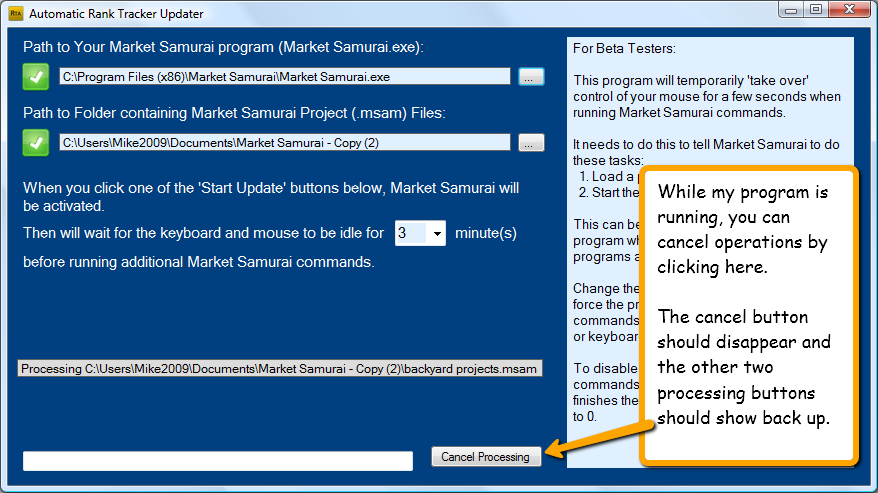
I’ve seen some of the same issues with Market Samurai locking up. My program must be very bullet proof if ‘regular’ users are going to run it. The way the program works in ‘running’ commands on Market Samurai makes that somewhat of a problem. I have seen in my testing that Market Samurai will stop… Read more »
List of WordPress Plugins You Need That Won’t Slow Down Your Site
|=Rating|=Plugin|=Link| | a | b | | c | d | One Half [one_half] Lorem ipsum dolor sit amet, consectetur adipiscing elit. Integer accumsan sagittis porta. Morbi dignissim leo sed metus dignissim convallis vel at libero. Aliquam vel rhoncus est. Nunc volutpat lacinia sagittis. Proin et velit vitae lectus elementum lacinia. Proin non eros eget… Read more »
Displaying a Featured Image Thumbnail
Lorem ipsum dolor sit amet, consectetur adipiscing elit. Ut eu nibh nisi, vel commodo arcu. Phasellus id viverra ipsum. Etiam commodo feugiat pretium. Aliquam pretium, nisl vitae dapibus ullamcorper, risus ligula euismod neque, in convallis elit dui vitae urna. Curabitur ligula lectus, bibendum in feugiat vel, condimentum sit amet turpis. Nunc non odio ac turpis… Read more »
Content Curation Shortcodes for Quotations and Citations

reating a nice clean quotation, testemonial or block quote in a WordPress post can be difficult. The only ‘built-in’ function that is available is the blockquote tag. This is how you can enter a blockquote in your post using the HTML tab: [cc lang=”html”] Quoted text here… [/cc] Each WordPress theme may render blockquotes in… Read more »
How To Add the XPFLUID Class to WordPress Images
Write a description here. Link to this page from the xPanda admin page so users can go here to see how to use fluid images.
The Best Way to Handle Your Text and Code Snippets
Functionality: Plugins vs Themes (see the link)
Functionality: Plugins vs Themes | Wptuts+ – http://wp.tutsplus.com/articles/general/functionality-plugins-vs-themes/ Nice post about how WordPress works: Between functions.php, widgets and plugins, which is loaded first? – WordPress Answers Good WordPress site about programming and plugins: Pippins Plugins | Daily WordPress Plugin Tutorials, Tips, Tricks, and Development WordPress Tutorial-Create Plugin: Create a Custom WordPress Plugin From Scratch |… Read more »
Recent Comments