Posts Categorized: xPanda Plugin
Make Your Own Category Page With an Automatic Slider

Step 1: Find the category name or ID number of the category you want to show. Hint: An easy way to show the ID’s on your WordPress Admin pages for categories, pages, posts, etc. is to us the WordPress › Reveal IDs plugin. Step 2: Create a new post or page. Step 3a: If you are… Read more »
Test: 2 Column Layout – Magazine Style
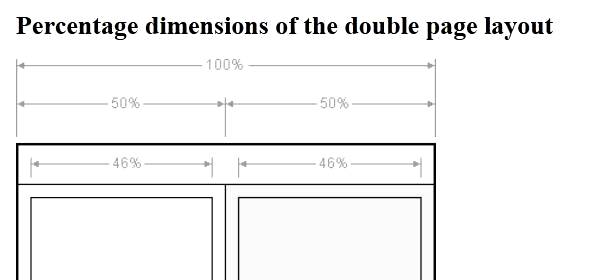
[ezc_list_posts show_slider=true category_id=’50’] [ezc_list_posts category_id=’50’ theme=’athens’ show_excerpt=’true’ columns=’2′ thumb_size=’100′] Only two lines of shortcode create the page above this line. One to show the slider, and one to show the posts for this category. The shortcode used is: [ezc_list_posts show_slider=true] [ezc_cat_page category_id=50]
KB Type Demo

Easy Content Slider Plugin Coming Soon… [xp_kb_slider name=’kb_test’ mode=’xf’ speed=’30’ fade=’1′ width=’640′ height = ‘145’] slider/geese.jpg, up slider/trumpeter.jpg, down slider/swimming.jpg, up slider/blackbird.jpg, down [/xp_kb_slider] [xp_kb_slider name=’speed_test’ mode=’xf’ speed=’30’ fade=’1′ width=’640′ height = ‘145’] slider/geese.jpg, up slider/trumpeter.jpg, down slider/swimming.jpg, up slider/blackbird.jpg, down [/xp_kb_slider] [xp_kb_slider sleep=’4′ fade=’1′ width=’640′ height = ‘200’] slider/veggies.jpg slider/peppers.jpg slider/beach.jpg slider/garden01.jpg [/xp_kb_slider]
Documentation – Easy Content Super List Posts
Back to IM Plugins and Tools Home Easy Content Super List Posts [ezc_list_posts show_excerpt=true theme=’bitola’ thumbnail_size=’100′ post_id=’726,7381′] What Is It? You can use this plugin to list posts or pages on your site in many different styles and combinations. Some of the things you can do: Automatically Show Posts in an Interactive Slider Show ‘Magazine… Read more »
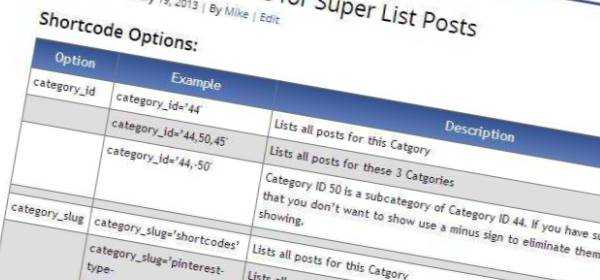
Shortcode Reference for the EZC Super List Posts plugin
Mauris rhoncus, lacus aliquet dapibus placerat, dui lectus ullamcorper justo, eu blandit purus elit sit amet dolor. Integer non sem id dolor rutrum cursus a eu lectus. Morbi suscipit tellus eros, sed porttitor est. Donec elit massa, hendrerit vitae suscipit vitae, sagittis consectetur tellus. Sed quis mi augue, at venenatis turpis. Curabitur id ultricies eros. Proin pharetra eleifend ipsum ac mattis. Nam semper lectus accumsan turpis laoreet eleifend. Morbi iaculis posuere felis, eget euismod eros malesuada at. Quisque ut lorem augue. Cras egestas porttitor malesuada. Cras in convallis tortor. Mauris in quam leo, nec viverra metus. Duis at felis quam.
List Posts in a Slider using the List Posts Plugin

It’s easy to create an interactive photo slider of your blog posts or pages using the [ezc_list_posts] shortcode. To create a slider for your site, simply add a new page or post and type the following shortcode into your visual editor: [ezc_list_posts show_slider=true] When you use the default settings the plugin will show your five… Read more »
Using the Super List Posts Plugin
Super List Posts is a powerful WordPress Shortcode plugin that you can use to display listings of your posts or pages. It is easy to use with no need to edit your template files or to use or modify PHP. There are many options available to display your listings including Magazine Style listings or displaying… Read more »
Test: 3 Column Layout – Magazine Style
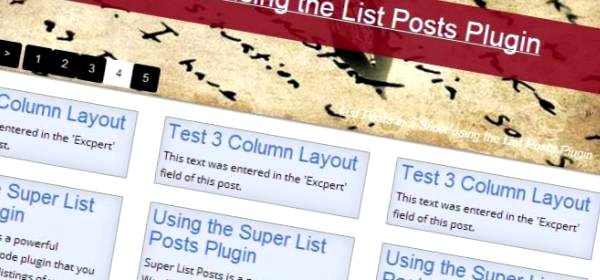
This text was entered in the ‘Excerpt’ field of this post.
Thumbnail Limitations in WordPress Media Gallery
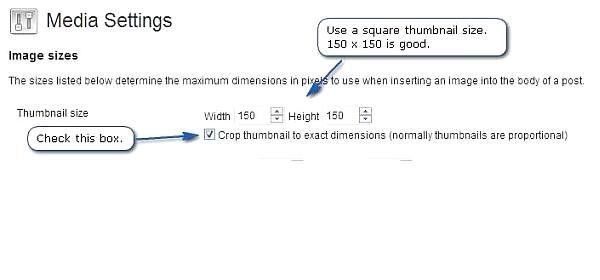
WordPress is a great platform. It’s really amazing in many, many ways. And the new Media Gallery features make working with photos a lot easier. But working with thmbnails can be difficult. When using the Super List Posts plugin, thumbnail images work best when you turn on the ‘Crop thumbnail to exact dimensions’ settings. Use… Read more »
Recent Comments